25 May 2022

Biometrics: How To Reconfirm Your Biometric Status If You Completed Your Biometrics Before 15th May, 2022

The Biometrics is a process of capturing and storing the fingerprint details of an Npower Batch C stream 2 using the NASIMS (Npower) Biometrics Client Software and a fingerprint image scanner, this stage is the first phase of the Npower Batch C stream 2 screening process and once it is not completed successfully the Npower Batch C stream 2 volunteer will not be able to progress to the next stage which is Npower Batch C stream 2 physical verification.

Although Npower Batch C stream 2 volunteers were sent a screening message months ago to complete their biometrics but with the new Biometrics software updates in place, previous biometrics might have been overwritten and this might result to previous biometrics not to be stored properly on the Npower NASIMS server database.

According to Npower, Npower Batch C stream 2 volunteers are to login into the NASIMS self service portal and reconfirm their biometrics status.


Npower batch c stream 2 volunteers are to follow the steps below to reconfirm their biometrics status;


HOW TO RECONFIRM YOUR BIOMETRICS STATUS IF YOU COMPLETED YOUR BIOMETRICS BEFORE 15TH MAY 2022


Npower Batch C stream 2 volunteers can reconfirm their biometrics status by following the tips below:


1) The Npower batch c stream 2 volunteer should login in into nasims website https://nasims.gov.ng/login using his or her Email address/Application ID and password.


2) After login into the NASIMS website the Npower Batch C stream 2 volunteer should click on the "verification" tab at the header of the nasims portal.


3) The Npower Batch C stream 2 should see a green tab with a mark saying "fingerprint captured ✓" under the message saying "Congrats on passing the screening phase. We just want to verify some of your details and you will be good to go. If you feel you missed out on any important detail during the application phase, kindly send an email to our support team via support.npower@nasims.gov.ng", immediately under the "verification" tab, once you see this message it simply means that your Biometrics is okay and you do not have to repeat the biometrics, it simply means you passed the biometrics.


4) On the other hand If after clicking the "verification" tab you see a green icon which says "capture fingerprint" under the message saying "Congrats on passing the screening phase. We just want to verify some of your details and you will be good to go. If you feel you missed out on any important detail during the application phase, kindly send an email to our support team via support.npower@nasims.gov.ng", immediately under the "verification" tab, then it simply means that you have not yet completed your biometrics successfully.


Npower Batch C Volunteers that have not completed their biometrics successfully are to quickly go to the nearest cyber cafe with strong internet connection and the Biometrics software and Fingerprint hardwares to complete their biometrics, once you experience the "some error occurred, please try again later" error message when attempting to complete your biometrics all you have to do is to send your Npower ID to Npower through twitter using their handle @npower_ng.


Biometrics: 8 Steps On How To Complete Your Biometrics Successfully As Biometrics Ends Friday 27th May 2022

The Npower NASIMS biometrics is a process whereby the fingerprint details of the Npower Batch C stream 2 volunteers are captured and stored in the Npower NASIMS database as a requirement for the screening process and as a requirement for the next stage of the screening process which is the Npower Batch C stream 2 physical verification, if your biometrics is not done properly you will not progress to the next stage which is the Npower Batch C stream 2 physical verification.

Therefore in order to complete your biometrics successfully, Npower Batch C stream 2 volunteers should follow the steps below strictly:


HOW TO COMPLETE YOUR BIOMETRICS SUCCESSFULLY AS BIOMETRICS ENDS ON FRIDAY


1) The Npower Batch C stream 2 volunteer should login into his or her NASIMS account using his or her NASIMS ID NUMBER, please note your NASIMS ID NUMBER is similar to your Npower ID number NPWR/XXXX


2) The Npower Batch C stream 2 volunteer should click on the "verification" tab to enable the Biometrics capture.


THE NPOWER BVN VALIDATION STAGE

The next stage is the BVN validation stage, this stage is extremely important, once an Npower Batch C stream 2 volunteer fails this BVN validation, he or she will not be able to continue with the Biometrics process.

The Npower Batch C stream 2 volunteer should follow the steps below to complete the BVN validation;


A) The Npower Batch C stream 2 volunteer should input his or her BVN number, email address, phone number, date of birth and state of origin.


B) The Npower Batch C stream 2 volunteer should click on "validate" after making sure that all details are correctly inputted.


C) Once the BVN validation is successful, the Npower Batch C stream 2 volunteer should click "continue."


3) The Npower Batch C stream 2 volunteer should install the NASIMS (Npower) Biometric Client by clicking "install".


4) After the installation of the biometric software the Npower Batch C stream 2 volunteer should input his or her NASIMS ID NUMBER and click "Proceed."


5) The Npower Batch C stream 2 volunteer should proceed with the biometrics using a computer device or a laptop and a fingerprint scanner, please note, the biometrics cannot be done with a mobile phone.


6) The Npower Batch C stream 2 should place the Index finger of the left hand on the fingerprint scanner until it is captured and checked, then place the thumb of the left hand until it is captured and checked, now place the Index finger of the right hand on the fingerprint scanner until it is captured and checked, then place the thumb of the right hand until it is captured and checked.


7) The Npower Batch C Volunteer should ensure each finger clicks all four parts.


8) The Npower Batch C stream 2 volunteer should submit the the biometrics, once submitted then your biometrics have been done successfully.


Npower batch C stream 2 volunteers having the "some error occurred" message should restart his or her computer system and repeat the process and ensure that the biometrics is done in a cyber cafe.

Npower Batch C stream 2 volunteers that have completed their biometrics months ago before the biometrics was officially announced are to wait for further directives from Npower.

The next stage after the Biometrics is the Npower Batch C stream 2 physical verification followed by the deployment stage, when it commences it will be communicated through NASIMS verification page and on all Npower social handles.

NEXIT Portal: How To Check If You Have Been Shortlisted For The Central Bank of Nigeria Npower Soft Loan Programme Without Using The NEXIT Portal

The NEXIT portal is a website created several months ago by the Federal Government of Nigeria in conjunction with the Central Bank of Nigeria, for the application and registration of exited Npower volunteers, in order to be eligible for the Central Bank of Nigeria Npower Soft Loan Exit Package to be given to exited Npower volunteers at the end of a weeks training, few exited Npower volunteers were able to login into the now defunct NEXIT portal www.nexit-fmhds.cbn.gov.ng and were able to register and apply for the Central Bank of Nigeria soft loan exit programme, while others were not able to complete their registration due to login issues and other issues such as wrong email address and password issues, this made the exited Npower volunteers not to gain access to the NEXIT portal and resulted to some exited Npower volunteers unable to apply for the Central Bank of Nigeria soft loan exit package.

Nothwithstanding exited Npower volunteers that were unable to gain access into the NEXIT portal can check if they have been shortlisted for the Npower NEXIT soft loan training which will eventually qualify them to receive the soft loan at the end of the Npower NEXIT training.

Exited Npower volunteers can follow the steps below to check if they have been shortlisted for the Central Bank of Nigeria soft loan exit package.


HOW TO CHECK IF YOU WERE SHORTLISTED FOR THE THE CENTRAL BANK OF NIGERIA NPOWER SOFT LOAN EXIT PROGRAMME


The following below are quick steps to take in order to check your Central Bank of Nigeria Npower Soft Loan Exit Programme and to confirm availability for the Central Bank of Nigeria Npower Soft Loan Programme:


1) Dial *45665# from any mobile network Airtel, MTN, Etisalat or Glo network (please ensure you have a minimum airtime amount of ₦100)


2) After dialing *45665# a welcome message will be displayed on your screen saying "Welcome to NSIP Service Choose Programme -


1. N-Power

2. NEXIT

3.CCT

4. HGSFP

5. S4J

6. Cancel"


3) Press "Answer" then press 2 then "send"


4) After pressing "send" another welcome message will appear on your phone screen saying"Welcome to NEXIT Information Service. Please Select the Service


1. Check Status

2. Confirm Availability

3. End


5) Press "1" then "send" to check your status.


6) A message will appear saying "To check status Please Enter your BVN or Mobile number".


7) Press "Answer" then input your BVN number then press "send".


8) A message will appear once again saying"To complete the request please authorize the charge of ₦30:00, press "Answer" then press "1" to Accept.


9) Press "1" then "send".


10) A message will say "Thank you".


11) Wait for few seconds to receive your sms text message.


12) Press "Show" to open the message it will display "Dear XXXXX XXXX, you have been shortlisted for NEXIT Batch 1 training in February. Please confirm your availability for the training using option 2 in NEXIT" what this message means is that you have been shortlisted for the Central Bank of Nigeria Npower Soft Loan Programme despite having issues with the NEXIT portal several months ago, if you were not shortlisted the message will read "You have not been shortlisted for the NEXIT Batch 1. Please try later. Please note, receiving the reject message does not mean you were not shortlisted for the Central Bank of Nigeria Npower Soft Loan Exit Programme, it only means that you were not shortlisted for the first batch of the Central Bank of Nigeria Npower Soft Loan Programme.


13) After completing step 12 repeat the above process then pick option 2 just to confirm your availability for the training. Exited Npower volunteers will be notified individually through email or text message and publicly on all Npower verified handles when the Npower NEXIT training commences.


Npower April Salary Will Soon Commence - Npower

Npower April stipend is the payment made to Npower Batch C Volunteers for the month of April, the Npower April stipend will reflect on the payroll under the payment table of the Npower Batch C Volunteers, the Npower April stipend will have informations such as:


1) Payment ID: This is the exact date of payment showing the day and month of payment.


2) Year: This is the year at which the payment is made.


3) Month: This is the month of payment.


4) Amount: This shows the amount paid to the Npower Batch C Volunteer and it is either ₦30,000 for Npower volunteers under the graduate category, and ₦10,000 for Npower batch c volunteers under the non graduate category.


5) Payment Status: This shows the condition of the payment, when the payment is initiated it becomes "pending", then after few days of processing the payment it becomes "processing", then when the stipend finally gets to the Npower Batch C Volunteer's deposit bank after passing through the payment gateway it becomes paid.


6) Reason: This shows the reason of the payment, once the Npower Batch C Volunteer is paid, this column remains blank until it changes to "Approved or Completed Successfully", but when the Npower Batch C Volunteer has "failed" payment, then the reason for the failed payment will be stated in this column.


Npower batch c volunteers have been asking "when the Npower April salary will commence?" 


According to Npower, the Npower April salary will soon commence, see statement below from Npower in response to an Npower Batch C stream 1 volunteer's question.


The Npower April Salary will commence when all March payments under "processing" have been cleared, as we speak the Npower March stipend is still ongoing, it is after all March payment have been cleared that is when the Npower April stipend will be initiated, this excludes all "failed" March payments.


Npower batch c volunteers are advised to always check their NASIMS payment status under the payroll tab for updates on their payments, once the Npower April stipend commences it will be displayed under the payroll tab of the Npower Batch C Volunteers.


24 May 2022

Npower: When Npower April Salary Will Be Paid

Npower April Salary is the stipend made to Npower Batch C Volunteers for the month of April, the Npower April salary will reflect on the payroll under the payment table of the Npower Batch C Volunteers, the Npower April salary will have informations such as:


1) Payment ID: This is the exact date of payment showing the day and month of payment.


2) Year: This is the year at which the payment is made.


3) Month: This is the month of payment.


4) Amount: This shows the amount paid to the Npower Batch C Volunteer and it is either ₦30,000 for Npower volunteers under the graduate category, and ₦10,000 for Npower batch c volunteers under the non graduate category.


5) Payment Status: This shows the condition of the payment, when the payment is initiated it becomes "pending", then after few days of processing the payment it becomes "processing", then when the stipend finally gets to the Npower Batch C Volunteer's deposit bank after passing through the payment gateway it becomes paid.


6) Reason: This shows the reason of the payment, once the Npower Batch C Volunteer is paid, this column remains blank until it changes to "Approved or Completed Successfully", but when the Npower Batch C Volunteer has "failed" payment, then the reason for the failed payment will be stated in this column.


WHEN NPOWER APRIL SALARY WILL COMMENCE 


Npower batch c volunteers have been asking "when the Npower April salary will commence?" According to Npower, the Npower April salary will soon commence, this statement was made by Npower in response to a question raised by a concerned Npower batch c volunteer. See statement below; 


"@npower, few days to month end, no April stipend yet."


"Good afternoon, Babalola O. B. Micheal be calm, payment will soon commence. N-power cares."


Npower batch c volunteers are advised to always check their NASIMS payment status under the payroll tab for updates on their payments, once the Npower April salary commences it will be displayed under the payroll tab of the Npower Batch C Volunteers.


Npower: When Npower April Stipend Will Commence

Npower April stipend is the payment made to Npower Batch C Volunteers for the month of April, the Npower April stipend will reflect on the payroll under the payment table of the Npower Batch C Volunteers, the Npower April stipend will have informations such as:


1) Payment ID: This is the exact date of payment showing the day and month of payment, Pay/11/12/202100000001 means you were paid exactly on the 11th December, 2021.


2) Year: This is the year at which the payment is made.


3) Month: This is the month of payment.


4) Amount: This shows the amount paid to the Npower Batch C Volunteer and it is either ₦30,000 for Npower volunteers under the graduate category, and ₦10,000 for Npower batch c volunteers under the non graduate category.


5) Payment Status: This shows the condition of the payment, when the payment is initiated it becomes "pending", then after few days of processing the payment it becomes "processing", then when the stipend finally gets to the Npower Batch C Volunteer's deposit bank after passing through the payment gateway it becomes paid.


6) Reason: This shows the reason of the payment, once the Npower Batch C Volunteer is paid, this column remains blank, but when the Npower Batch C Volunteer has "failed" payment, then the reason for the failed payment will be stated in this column.


WHEN NPOWER APRIL STIPEND WILL COMMENCE 


Npower batch c volunteers have been asking "when the Npower April stipend will commence?" The Npower April stipend will commence when all March payments under "processing" have been cleared, as we speak the Npower March stipend is still ongoing, it is after all March payment have been cleared that is when the Npower April stipend will be initiated, this excludes all "failed" March payments.


Npower batch c volunteers are advised to always check their NASIMS payment status under the payroll tab for updates on their payments, once the Npower April stipend commences it will be displayed under the payroll tab of the Npower Batch C Volunteers.


Npower Batch C Stream 2: Npower Biometric Software Download

The Npower Biometric Software is an application operated by the Npower NASIMS server which after installation is capable of capturing the fingerprint details of an Npower Batch C stream 2 volunteer, and registers these fingerprint into the Npower NASIMS database, for the screening process, this Biometric Software is an extremely important application because without it the Npower Batch C stream 2 volunteer will not be able to complete his or her biometrics.

The issue here is that most Npower Batch C stream 2 volunteers that have a laptop do not know how to download and install this Biometric Software.

In order to download the Npower Biometric Software the Npower Batch C stream 2 volunteer should follow the simple tips below:


Please note, this operation cannot be done using a mobile phone, but can be done using only a computer system or a laptop with a finger print scanner hardware available.


HOW TO DOWNLOAD THE NPOWER BIOMETRIC SOFTWARE


The Npower Batch C stream 2 volunteer should follow the procedures below to download the Npower biometric software:


1) The Npower Batch C stream 2 volunteer should click the Npower Biometric application download link https://nasimsbiometric.blob.core.windows.net/enrollment/Publish.htm


Please note that for computer systems or laptops using Windows Operating System (OS) running on 64bits, the Npower Batch C stream 2 volunteer will need to download the installer by visiting:


https://dotnet.microsoft.com/download/dotnet/thank-you/runtime-desktop-5.0.6-windows-x64-installer


For computer systems or laptops using Windows Operating System (OS) running on 32 bits the Npower Batch C stream 2 volunteer should visit:


https://dotnet.microsoft.com/download/dotnet/thank-you/runtime-desktop-5.0.6-windows-x86-installer


2) After completing the above task, the Npower Batch C stream 2 volunteers should click on “Install” to install the NASIMS Npower Biometrics Prerequisite application on your computer or laptop.


3) After the installation, the Npower Batch C stream 2 volunteer should click on “Launch” to start the application, the Npower Batch C stream 2 volunteer should follow the onscreen prompts and instructions to capture his or her fingerprint.


Npower batch C stream 2 volunteers are advised to strictly carry out the above task using a very strong internet connection and ensure that all hardwares such as the fingerprint scanners and computer systems/laptops are well connected.


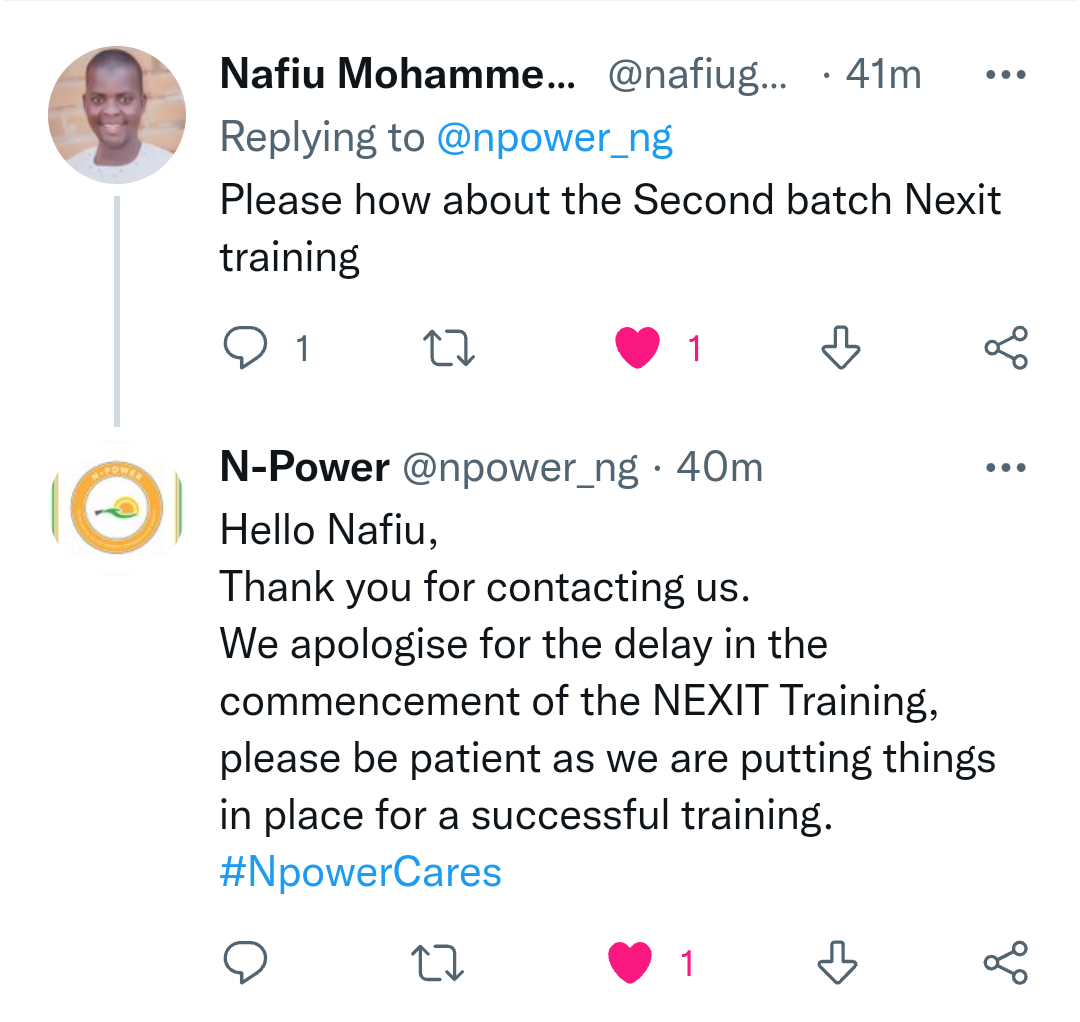
NEXIT: How To Know When The Second Batch Of The Npower NEXIT Training Will Commence

The second batch of the Npower NEXIT training will see about 154,400 exited Npower volunteers trained by the state Npower Nexit training consultants, after the second batch of the Npower NEXIT training which will last for 7 days, Npower volunteers will be given NEXIT training certificates and will be mandated to complete a business plan although in some states the business plans will be adjusted and submitted on behalf of exited Npower volunteers.

The challenge is that most exited Npower volunteers scheduled for the second batch of the Npower NEXIT training do not have an idea when the Npower NEXIT training for the second batch will begin.


WHEN THE SECOND BATCH OF THE NPOWER NEXIT TRAINING WILL BEGIN


According to Npower in recent reports the second batch of the Npower NEXIT training will start when all things are put in place to ensure a successful training. The things to be put in place are the compilation of the list of the second batch of the Npower NEXIT training and the logistics of the Npower NEXIT training consultants, once these are put in place then the second batch of the Npower NEXIT training will begin.


Exited Npower volunteers have been advised to exercise patience and wait for the list to be sent to the state Npower Nexit training consultants, once the compiled list is received then the second batch of the Npower NEXIT training will commence, without this list sent to the state Npower Nexit Training consultants the second batch of the Npower NEXIT training cannot begin.


23 May 2022

Npower Batch C Stream 2: How To Check If Your Name Is In The Npower Stream 2 Final List

The Npower final list is a document which contains the names of Npower Batch C Volunteers that have passed the first phase of the screening process which is the shortlisting stage, the first stage of the Npower Batch C screening process is the shortlisting phase followed by the biometrics.

Npower Batch C stream 2 volunteers can check if their names are on the Npower Batch C stream 2 final list by following the simple tips below;


HOW TO CHECK IF YOUR NAME IS ON THE NPOWER BATCH C STREAM 2 FINAL LIST USING NASIMS PORTAL 


Npower Batch C stream 2 volunteers can check if their names are on the Npower Batch C stream 2 final list by following the tips below:


1) The Npower batch c stream 2 volunteer should login in into nasims website https://nasims.gov.ng/login using his or her Email address/Application ID and password.


2) After login into the NASIMS website the Npower Batch C stream 2 volunteer should click on the "verification" tab at the header of the nasims portal.


3) The Npower Batch C stream 2 will see a message saying "Congrats on passing the screening phase. We just want to verify some of your details and you will be good to go. If you feel you missed out on any important detail during the application phase, kindly send an email to our support team via support.npower@nasims.gov.ng", immediately under the "verification" tab, once you see this message it simply means that your name is in the Npower Batch C stream 2 final list.


4) If after clicking the "verification" tab it says that "you have not been shortlisted yet, check back later" then it simply means that your name is not in the Npower Batch C stream 2 final list.


HOW TO CHECK IF YOUR NAME IS ON THE NPOWER BATCH C STREAM 2 FINAL LIST USING *45665# NASIMS USSD CODE


Npower Batch C stream 2 volunteers can use the nasims ussd code *45665# to check if their names are on the Npower Batch C stream 2 final list, please before dialing the nasims ussd code *45665# ensure that you have enough airtime at least a minimum credit balance of ₦100.

Follow the procedures below to check if your name is on the Npower Batch C stream 2 final list using the nasims ussd code:


1) The Npower batch c stream 2 volunteer should dial *45665# from any mobile network; Etisalat, Glo, Airtel, MTN.


2) After dialling the nasims ussd code *45665# a welcome message will pop up on your phone screen saying "Welcome to NSIP Service Choose Programme -


1. N-Power


2. NEXIT


3.CCT


4. HGSFP


5. S4J


6. Cancel"


3) Select "Answer" then press 1 then "send".


4) After completing the above task another message will pop up on your phone screen saying " Welcome to N-Power Information Service. Please Enter your BVN or Registered Mobile Number.


5) Press "Answer" then enter your BVN, then press "Send".


6) After doing this a message will appear saying "To complete the request please authorize the charge of ₦30:00.


7) Press "Answer".


8) Press 1 to send.


9) A message will pop up saying "Thank you."


10) Wait for few seconds to receive your text message.


11) Press "show" to open the message, it will display the message below:


 "CONGRATULATIONS! You have been selected for N-Power Batch C, Stream II".

Once you get this message it simply means that your name is on the Npower Batch C stream 2 final list, proceed to a cyber cafe and complete your biometrics if you have not completed your biometrics, if you have already done your biometrics please you do not need to repeat the biometrics all you have to do is keep checking your verification page on NASIMS portal for the Npower Batch C stream 2 physical verification date.


12) On the contrary if you were not shortlisted you will see the message "you have not been shortlisted, check back later', and this simply means that your name is not on the Npower Batch C stream 2 final list.


The above procedures are quick tips an Npower Batch C stream 2 volunteer can use to determine if his or her name is on the Npower Batch C stream 2 final list, instead of waiting for the list to be pasted before physical verification commences, the Npower Batch C stream 2 volunteer already knows that his or her name is on the Npower Batch C stream 2 final list because it has been checked using the above procedures.


Npower Batch C Stream 2: How To Find Out When The Npower Batch C Stream 2 Deployment Date Will Be Set

The Npower Batch C stream 2 deployment date is the date at which the Npower Batch C stream 2 deployment begins and this is the last stage of the Npower Batch C screening process after the Npower physical verification, during this period Npower Batch C stream 2 volunteers will be requested to download their deployment letter or place of primary assignment (PPA) letter otherwise known as acceptance letter from their National Social Investment Management System (NASIMS) portal, once this PPA letter or deployment letter is downloaded, the PPA letter is to be printed out and taken to the place of primary assignment the address of the place of primary assignment will be displayed on the deployment page of the Npower Batch C stream 2 volunteer, after printed out this hard copy, the Npower Batch C Volunteer is given three days to sign the letter by an assigned supervisor at his or her place of primary assignment, after the acceptance letter must have been signed the Npower Batch C stream 2 volunteer will upload the acceptance letter to the deployment page and resume at his or her place of primary assignment within this three days, in some cases the acceptance letter might be rejected by the assigned supervisor, once this is done, the Npower Batch C stream 2 volunteer is to upload the rejection letter as the case may be onto the deployment page of the NASIMS profile then the Npower Batch C stream 2 volunteer can apply for redeployment to another place of primary assignment by following the instructions for deployment spelt out on the nasims portal. 


The major problem with respect to the Npower Batch C stream 2 deployment date is that most Npower Batch C stream 2 volunteers do not know how to find out or make inquires regarding when the Npower Batch C stream 2 deployment date will be set, infact most Npower Batch C stream 2 volunteers do not know who to contact and how they are to carry out the process of contacting Npower with respect to the Npower Batch C stream 2 deployment commencement date.

In order to find out when the Npower Batch C stream 2 deployment date will be set, Npower Batch C stream 2 volunteers can follow the simple tips below:


HOW TO FIND OUT WHEN THE NPOWER BATCH C STREAM 2 DEPLOYMENT DATE WILL BE SET USING TWITTER 


1) The Npower Batch C stream 2 volunteer should download the twitter application from Google playstore and install the twitter app, after downloading the twitter application please lunch the twitter application from your mobile phone or laptop depending on the device you are using, after lunching the twitter application, register with your email address or phone number, you can use any email address or the email address you used for your Npower registration or the phone number used for Npower registration, generate your password, you might be required to click the link sent into your email inbox before you can login.(please you can skip this part if you already have the twitter app)


2) Once the Npower Batch C stream 2 volunteer confirms his or her login details, the Npower Batch C stream 2 volunteer should login into the twitter application, once the twitter page opens, the Npower Batch C stream 2 volunteer will see an icon on the footer of the page, the icon resembles a magnifying glass icon 🔍 click on it.


3) After clicking on the magnifying glass icon 🔍, it opens another page, you will see a search field at the top of the page which says 🔍 Search Twitter, enter @npower_ng into this search field, then click on the sky blue round circle with feather and a + sign located at the bottom right hand corner of the page, when you click on this sky blue round circle, all you have to do is compose a brief message, the content of the message should be brief, just say "I want to find out when the Npower Batch C stream 2 deployment date will be set?"


4) After completing step 3 please do not repeat the task, just wait and keep checking your Twitter application under the notification bell icon at the footer of the page, for a response, even if you did not get any response, your inquiry has been received and will be responded to accordingly.


HOW TO FIND OUT WHEN THE NPOWER BATCH C STREAM 2 DEPLOYMENT DATE WILL BE SET USING NPOWER CUSTOMER SERVICE AGENT


Please before performing the procedures below please ensure you have enough airtime at least ₦100, before making this call.


1) The Npower Batch C stream 2 volunteer making the inquiry should dial 092203102, when you dial this number it might not go through because this is Abuja situation room, the customer care center number and all Npower customer care service agents might be extremely busy, please move to step 2.


2) The Npower Batch C batch C stream 2 volunteer should dial 018888148, this is Lagos Npower customer service agent, even if you do not reside in Lagos, you can still dial this number.


3) Please after dialling 018888148, listen to the voice prompt and follow the instructions from the voice prompt.

The voice prompt will say for complaint press 1.


4) The Npower Batch C batch C stream 2 volunteer should press 1, after pressing 1 please wait even if the Npower customer service agent is not available please do not end the call.


5) Once the Npower customer service agent comes, he or she will say "Welcome to NSIP...... what is your name and where are you calling from?" 


6) The Npower Batch C stream 2 volunteer should provide his or her names and location to the Npower care service agent, just say "I am John Doe, I am calling from Lagos" this is just an example, please be brief when introducing yourself, the Npower customer service agent will now ask you what your issue is.


7) When presenting your inquiry please go straight to the point, just say "I want to find out when the Npower Batch C stream 2 deployment date will be set?"


8) The Npower customer care agent will receive all your information and will respond accordingly.


Npower Batch C stream 2 volunteers should always forward their inquires to the appropriate channels in order to get prompt and swift responses from Npower, forwarding your inquires to the inappropriate channels might result to your inquiry not given the adequate response and attention needed.


Npower Batch C Stream 2: How To Find Out When The Npower Batch C Stream 2 Physical Verification Date Will Be Set

The Npower Batch C stream 2 physical verification date is the date at which the Npower Batch C stream 2 physical verification commences, during this period Npower Batch C stream 2 volunteers will be requested to provide both original and photocopies of all documents uploaded to the National Social Investment Management System (NASIMS) portal, some of the documents includes but not limited to;


1) HND, OND, BSC Certificates

2) WAEC Certificate

3) NYSC Certificate or Exemption Certificate

4) Birth Certificate or Age Declaration

5) BVN Printout (though not necessary in some states)

6) Residential Certificate

7) Means Of Identification either, National Identity Card, Voters card, Driver's Licence, Or International Passport all capturing the biodata page.

8) Utility Bill; PHCN Bill, Waste Bill

9) NASIMS Print out, although not necessary in some states

10) Passport Photo 


The challenge is that most Npower Batch C stream 2 volunteers do not know how to find out or make inquires regarding when the Npower Batch C stream 2 physical verification will commence, infact most Npower Batch C stream 2 volunteers do not know who to contact and how they are to carry out the process of contacting Npower with respect to the Npower Batch C stream 2 physical verification commencement date.

In order to find out when the Npower Batch C stream 2 physical verification will commence, Npower Batch C stream 2 volunteers can follow the simple tips below:


HOW TO FIND OUT WHEN THE NPOWER BATCH C STREAM 2 PHYSICAL VERIFICATION WILL COMMENCE USING TWITTER 


1) The Npower Batch C stream 2 volunteer should download the twitter application from Google playstore and install the twitter app, after downloading the twitter application please lunch the twitter application from your mobile phone or laptop depending on the device you are using, after lunching the twitter application, register with your email address or phone number, you can use any email address or the email address you used for your Npower registration or the phone number used for Npower registration, generate your password, you might be required to click the link sent into your email inbox before you can login.(please you can skip this part if you already have the twitter app)


2) Once the Npower Batch C stream 2 volunteer confirms his or her login details, the Npower Batch C stream 2 volunteer should login into the twitter application, once the twitter page opens, the Npower Batch C stream 2 volunteer will see an icon on the footer of the page, the icon resembles a magnifying glass icon 🔍 click on it.


3) After clicking on the magnifying glass icon 🔍, it opens another page, you will see a search field at the top of the page which says 🔍 Search Twitter, enter @npower_ng into this search field, then click on the sky blue round circle with feather and a + sign located at the bottom right hand corner of the page, when you click on this sky blue round circle, all you have to do is compose a brief message, the content of the message should be brief, just say "I want to find out when the Npower Batch C stream 2 physical verification will commence?"


4) After completing step 3 please do not repeat the task, just wait and keep checking your Twitter application under the notification bell icon at the footer of the page, for a response, even if you did not get any response, your inquiry has been received and will be responded to accordingly.


HOW TO FIND OUT WHEN THE NPOWER BATCH C STREAM 2 PHYSICAL VERIFICATION WILL COMMENCE USING NPOWER CUSTOMER SERVICE AGENT


Please before performing the procedures below please ensure you have enough airtime at least ₦100, before making this call.


1) The Npower Batch C stream 2 volunteer making the inquiry should dial 092203102, when you dial this number it might not go through because this is Abuja situation room, the customer care center number and all Npower customer care service agents might be extremely busy, please move to step 2.


2) The Npower Batch C batch C stream 2 volunteer should dial 018888148, this is Lagos Npower customer service agent, even if you do not reside in Lagos, you can still dial this number.


3) Please after dialling 018888148, listen to the voice prompt and follow the instructions from the voice prompt.

The voice prompt will say for complaint press 1.


4) The Npower Batch C batch C stream 2 volunteer should press 1, after pressing 1 please wait even if the Npower customer service agent is not available please do not end the call.


5) Once the Npower customer service agent comes, he or she will say "Welcome to NSIP...... what is your name and where are you calling from?" 


6) The Npower Batch C stream 2 volunteer should provide his or her names and location to the Npower care service agent, just say "I am John Doe, I am calling from Lagos" this is just an example, please be brief when introducing yourself, the Npower customer service agent will now ask you what your issue is.


7) When presenting your inquiry please go straight to the point, just say "I want to find out when the Npower Batch C stream 2 physical verification will commence?"


8) The Npower customer care agent will receive all your information and will respond accordingly.


Npower Batch C stream 2 volunteers should always forward their inquires to the appropriate channels in order to get prompt and constructive responses from Npower, forwarding your inquires to the wrong channels might result to your inquiry not given the adequate response.


Featured post

ECOWAS Bank For Investment And Development (EBID) Young Professionals Programme

  The ECOWAS Bank For Investment And Development (EBID) Young Professionals Programme is an opportunity for qualified young graduates and ea...